
How to Set Up Google Site Kit in WordPress?
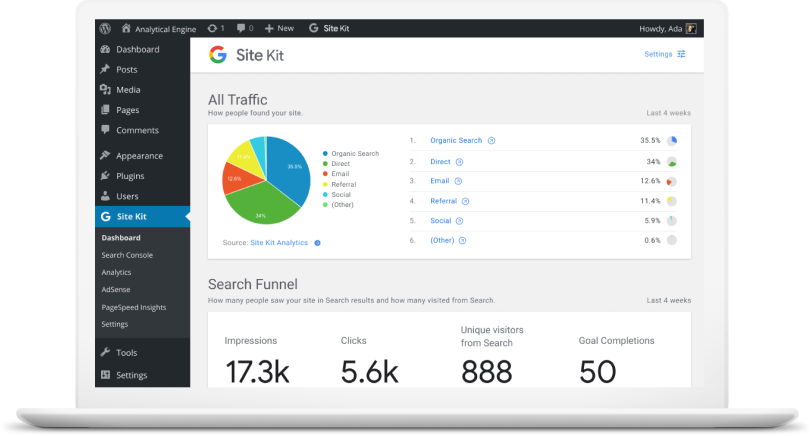
Google Site Kit is a brand new SEO/analytics plugin developed by Google for WordPress. It enables you to connect Google’s online marketing services such as Search Console, Google Analytics, PageSpeed Insights, Google AdSense, Google Optimize and Google Tag Manager – directly to your WordPress site. Once connected, you’ll be able to view search, analytics, PageSpeed performance and other data, directly in your WordPress dashboard, and individually in posts and pages. This is super helpful in gaining page-level insights directly in your WordPress dashboard. In this tutorial, we’ll show you how to install and configure Google Site Kit in WordPress and connect the two most popular Google services to your WordPress dashboard – i.e. Google Search Console and Google Analytics. GET GOOGLE SITE KIT Quick note: Site Kit refers to Google’s services as “properties”. Thus we’ve used the terms “Google services” and “properties” interchangeably in the remainder of the article. Overview of Google Site Kit in WordPress It is important to understand that Google Site Kit’s primary job is to connect (or link) your WordPress site to the corresponding Google services such as Search Console and Analytics. Ideally, you should have previously configured both Search Console and Google Analytics in your WordPress site. If not, then we recommend you first setup both Google Analytics and Search Console before installing Google Site Kit. While Google Site Kit can create a new account for some properties such as Search Console, you should refrain from doing so. We recommend you manually set up both Analytics and Search Console, since the manual method gives you a much better understanding of how marketing analytics works. Here’s a quick overview of what you’ll be doing: Manually install the Google Site Kit plugin. Create and link a new client configuration: A simple click-click-copy-paste job, where Google does most of the heavy lifting for you. Link properties (Google services) such as Google Search Console and Google Analytics to Site Kit. Let’s get started with the tutorial! Source Credit https://www.wpexplorer.com/google-site-kit-wordpress/
Importance of SEO for Your Business Now & In the Future
When brands take a long-term look at the importance of SEO, however, they will see that the benefits only multiply the longer they remain focused on the power of optimization. As your SEO improves, the returns you receive will far outweigh your initial investment. Let’s take a look on importance of SEO- The Importance of SEO Now and in the Future 1. Brand building Brand building can help create powerful organizations. When people recognize your logo, colors, and name with a positive reputation that precedes you, it can help build greater trust with prospects. SEO and digital marketing can help capitalize on this. As already discussed, consumers use the internet to research pain point solutions, products, and services. A strong presence online will build your brand and increase your market share. Your site will regularly pop up for searches relevant to your organization. Customers will become familiar with your name and business. A strong online presence will encompass many channels. A complete SEO strategy will involve employing platforms, such as social media. Your brand will be present to customers throughout their digital lives, enhancing recognition and leads. 2. Better positions on the SERP Your position on the SERP will play a large role in the number of clicks you receive. According to Advanced Web Ranking, the top three positions alone on the SERP receive an average of 60% of all the clicks. This means that the higher your site appears, the more results you will gain from your efforts. Focusing on the importance of SEO will help you improve your rankings. As Google recognizes the value that your site offers users in this sector, you will rank higher. SEO helps you to communicate better with the search engine algorithms. Your topic will become clearer to the search engine spiders. You will also let the search engines know for which queries you will be relevant. Customers associate higher rankings on the SERP with industry leaders. Google’s algorithm carefully sorts through content to find the material that provides the most value to the customer and works to separate the content that people can trust from that which they cannot. Customers know that Google’s algorithm generally returns them the sites that will provide them with the best answer. This builds trust. When you earn some of the top ranking positions on the SERP, it provides an excellent platform to promote yourself as an industry leader and someone these consumers can trust. 3. More traffic As you build your rankings, you will be in a greater position to boost your traffic. SEO best practices include optimizing both your titles and meta descriptions to make your topic clear. This lets your customers know precisely what your piece offers. Customers want to know that your site will address their needs. Optimizing these aspects of your site will help persuade them to click. When you combine these elements with the stronger site rankings you get through optimization, you will see increases in your traffic rates. More people will come to your website. As you introduce more people to your websites, you will also nurture more opportunities for people to become leads and then convert. The importance of SEO cannot be underestimated when it comes to organic revenue growth. 4. Higher percentage of traffic becoming leads SEO will also increase the percentage of your traffic that becomes leads. SEO focuses on understanding what prospective customers want to see and then fulfilling those needs. Creating a strong SEO strategy, therefore, will result in a site that is tailored more towards your target customers. With SEO, you need to analyze your sales funnel and determine what people want to see at each stage. You will be able to map your target customer personas to their stages of the buyer’s journey, and thus create more effective content. With content that better engages your visitors, you will be able to lead your prospects through the sales funnel more easily. Customers will be able to find the content they want and you will know how to move them to the next level. This will result in a higher percentage of conversions at each stage. 5. Business growth outside of geographic boundaries With traditional marketing, businesses often remain confined to their immediate geographic area. You promote yourself with direct mail, radio broadcast, and billboards, for example, which only people who live in your area see. With SEO, you have the opportunity to expand your reach beyond your region. You can do business with people across the country. By understanding the importance of SEO and creating an optimized site, your page can rank highly on SERPs for people in a number of different locations. When your content is relevant, it will appear regardless of whether the prospect lives next door or thousands of miles away. SEO, therefore, provides your organization with greater room to grow. You have the chance to expand your prospective audience and thus increase your reach. You will be able to expand your business on a level that would not have been possible previously. 6. Greater understanding of what customers want to see Customers today like to know that businesses understand their pain points. They want to work with companies who address their individual needs. Modern customers want to nurture relationships with businesses and not be viewed as only a number. To serve these customers, both online and offline, you want to intimately understand your customers. This means going deeper than targeting people within a particular age range. You want to understand people’s behavior and why they do certain actions. Before SEO and digital marketing, businesses relied on market research and basic analysis of their own merchandise. They used market research to identify trends in their consumer habits, for example, and would use sales data to see which products and services were the most popular with customers. SEO, however, offers an entirely new level to the ability to understand the customer. Through paying attention to the importance of SEO, you will
How to Create a Powerful Inbound Marketing Strategy?
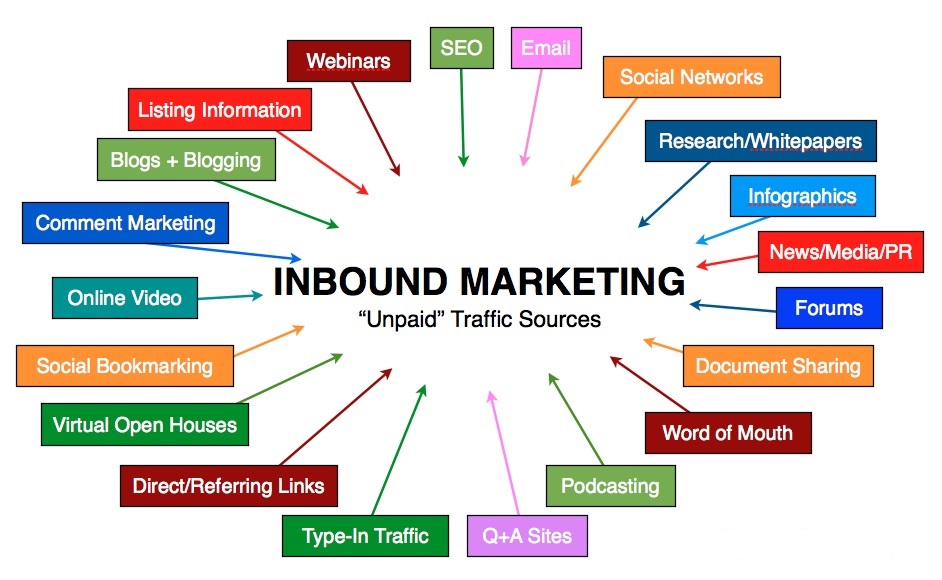
So how does one create a solid inbound marketing strategy? Mass marketing or “push” advertising worked extremely well in the earlier days. But times are changing, and so are consumer preferences. It’s an undeniable fact that consumers online are doing their homework before buying something, especially when they are faced with multiple options. They’re using Google to research products and social media to seek recommendations from friends/family. This is why inbound marketing is gaining more importance than regular outbound marketing. So as a business, you need to understand how “aware” consumers are and what you need to do to get on their radar with a real inbound marketing strategy. There’s no doubt that consumers today want to… Be given priority and get educated about their own problems. Do business with brands that they are familiar with. Know your history and how you’ve helped others in the past. Get more comfortable with the solution they are buying into. The era of hyper-personalized marketing goes beyond relationship marketing. Which means… If you are building a relationship with your target audience, you are increasing the chances of getting more sales. If you are educating them beforehand and giving them the information they need to make a decision, you are making it easy for them to do business with you. If you are delivering value first, you’re giving them a reason to trust your brand. If you are pulling consumers towards your brand instead of pushing your products on them, you’re winning their attention. By focusing on inbound marketing, you are doing all of the above. Which not only helps you get more out of your marketing efforts, but also lets you stand out from the competition. Source Credit https://www.lyfemarketing.com/blog/inbound-marketing-strategy/
Simple WooCommerce Tips To Increase Sales
Where do you stand currently in your WooCommerce store endeavor? Maybe you are planning to launch your WooCommerce store, or maybe you have been running it for a couple of years now. No matter where you’re at you need to work hard on increasing your sales either way. From growing your email list to social media marketing, there are many mediums and platforms you can leverage to increase the sales for your WooCommerce store. However, you need to identify which of them are most useful and give you a better ROI (return on investment). To help you grow your WooCommerce store and increase your sales, I have put together a simple WooCommerce guide. When you finish reading this guide, you will be privy to various tactics including how you can optimize your WooCommerce store in order to boost your sales. Let’s hop in! 1. Choose an Eye-catching WooCommerce Theme As soon as your leads enter your store, the first thing they see is the theme and the overall layout of your store. If they like what they see, then they are definitely going to take a closer look and take time browsing through your store. However, if they see a cluttered and confusing layout, they are going to press the exit button without giving your store a second glance. E-commerce store visitors expect to see an eye-catching user interface that is not only visually appealing but also easy to navigate. Your users should be able to interact with your WooCommerce store without any confusion. All in all, you need to offer an easy and seamless experience to your customers. WooCommerce themes, by and large, can be classified under three categories: Free WooCommerce themes Paid WooCommerce themes Custom WooCommerce themes While you need to choose the theme that best suits your pocket, there’s one important thing you need to keep in mind. Being able to use a free WooCommerce theme is, of course, an added advantage, however, such themes often lack in terms of design and functionality. Therefore, if you truly want to find success in your WooCommerce endeavor, then it is a better idea to opt for paid WooCommerce themes. You don’t necessarily have to spend big bucks purchase a theme. In fact, you should be able to get a great theme for under $100. Lastly, if you are able to shell out a big budget, then you can also get a customized theme. Internet is inundated with so many credible bespoke theme designers and website developers. Costs also vary – but whatever the cost, it is definitely going to cost you more than a pre-existing premium WooCommerce theme. 2. Offer an Easy and Friendly User-Experience The friendlier user-experience you offer, the more people will convert into permanent customers. It’s no brainer — if your leads find it hard to navigate through your website, they are going to abandon it without giving a second thought. Let me be blunt here: yours is not the only store on the internet, the list of your competitors is pretty big. All in all, your leads are not exactly lacking in choice. A big part of a user-friendly e-commerce experience is simple navigation. It directly attributes to a comfortable environment for your visitors. This can easily be achieved using breadcrumb links and navigation menus. WooCommerce Breadcrumbs Simply put, it allows you to customize the default WooCommerce breadcrumbs. Breadcrumbs improve navigation, not just for robots, but for customers too, as they’re able to navigate back to previously browsed categories. This helps them stay on your site for longer without having to hit the back button a thousand times, and it helps search engines index your site for better search ranking. WooCommerce Breadcrumbs helps navigate the site indexing portion of your navigation and makes it easier to put them in place. WooCommerce SEO This premium Yoast SEO extension adds support for WooCommerce, including improved breadcrumbs. Please note that Yoast does not automatically optimize your site for search, but is instead a fantastic tool to help you optimize your content before it even gets published. Much as what Yoast does for blog posts, it continues that work in product pages, sitemaps, and navigation. WooCommerce Product Table Apart from this, you can also incorporate a product table in your WooCommerce store. It will help your audience get a succinct view of your product description, price, important attributes, and a clear “Add to Cart” CTA button. For this, one of the best options is the WooCommerce Product Table plugin by Barn2. This plugin organizes your products into lists that can be shown when a customer searches or filters in your catalogue. Not only does this help the customer find what they’re looking for, it helps search engines index each of your products to make them more easily findable. 3. Add Clear Call to Action (CTA) buttons Buy Now. Add to Cart. Sign up. I think we are all familiar with all these call-to-action buttons. But the main motive is not just to add CTA buttons but to add them in such a manner that they fuel your conversion rate. For that, you need to place your CTA buttons at the right place so that they immediately get discovered by your leads. One thing that you need to keep in mind is that your leads should not have to skim down web pages just to take action. For instance, if a customer intends to add a product to their cart, the “Add to Cart” button should be readily available. They should not need to scroll through your page or to go to great lengths to find it. CTA buttons such as “Add to Cart” and “Checkout Now” especially should be added in prominent places in your WooCommerce store . Moreover, they should not blend in with the website — make sure that they stand out so that your customers immediately distinguish them from the rest of the website and quickly take action. Take advantage of any built-in styling options your WordPress theme
10 Proven SMB Marketing Strategies That Will Work For You

Are you implementing a SMB marketing strategy for your business? Small businesses always have it tougher than well-established businesses when it comes to marketing. First of all, just starting out is a challenge. Whether you are a large or a small company, numerous challenges will be hurled your way. But if you are a small business, then those challenges are magnified. Shortages in budget, time, or manpower are a few examples of those hurdles. Whether a business is built as a B2B or B2C, challenges are present right from the get-go. What about medium-sized businesses? Medium sized businesses do not have it any easier. Sure, they might have a little more when it comes to resources, but not that much. Whatever the struggles that they go through, small-to-medium sized businesses or SMB’s are gaining in prominence. They make up a whopping 99.7% of all businesses in the United States, after all. New SMBs are also being established on a regular basis. So how do they deal with the ups and downs and emerge as one of those that last and succeed? The antidote is SMB marketing. This is a term that refers to the method by which small and medium sized companies market their products. Obviously, they try to do it using a conservative budget, and they are constantly on the lookout for low-cost ways to convert and get sales. Here are 10 proven SMB marketing strategies that will help push your brand while you save. 10 Proven SMB Marketing Strategies That Will Work For You Setting a Goal and a Budget To market your business right, you need to set a goal. What is your vision and endgame for your business? The primary SMB marketing strategy is to set the right goal and a reasonable budget. What do you really want to happen? Are you looking to expand your company’s reach, or do you want to strengthen your hold on the local market? Do you want people to become aware of your brand? All these are valid goals, of course. But as you set the goal or goals that you want to accomplish, you also need to think about your budget. Your budget needs to be in sync with what your goals are. At the same time, it needs to be realistic and practical. The thing is, your goals will not be relegated to just one or two. It is likely that you have several. To avoid confusion and to make it easier to track your growth, you have to prioritize your goals. Which goal matches your most pressing need? Identify that and focus on it first. Then you can set your sights on the long-term goals that you consider to be the most important for your business. Maximize Google’s Local Offerings You can also take advantage of Google’s local offerings. With Google being the largest search engine available, it can definitely offer a lot for small and medium-sized businesses. Having an online presence is a big boost to any SMB, which is almost always a local business. In fact, when you compare a business that is found online with one that is not, the one found online will grow 40% faster. That makes a Google My Business account indispensable for an SMB. For a local business that targets local clients, this is a powerful tool. By having a Google My Business account, you can take charge of the information about your business. That includes address, phone number, website, and hours of operation. Google My Business is also the best place for you to combine all your Google platforms, which include your Google reviews, Google Maps profile, and many more. By having a Google My Business account, your business becomes more credible and more visible to consumers. Choose The Top Social Media Channels To Focus On You might have read somewhere that having an account across all social media channels is the way to go. You have the budget for that and you know your target market exists on every social media platform, go for it! However, if you are an SMB and you are a little short on personnel, then you might not be able to keep up with all your social media channels all the time. Choosing just one to three social media channels to focus on seems to be the wiser choice. Start by analyzing your overall presence on social media. Which of the channels feature the highest number of engagements? That should be your clue about which channel you need to choose. Once you have made your choice, then you can turn your sight to the possible tools that you can use for help. For example, you might want to have someone else take charge of scheduling your social media posts for you. Hootsuite is your best tool for that. Or maybe you want to monitor the keywords that you use. Then Mention is the tool to use. Content Marketing Content marketing is useful for getting long-term results. So if you have a long-term vision for your business, then this is the perfect SMB marketing strategy for you. You need to understand that it is a process in which you have to create content that is Valuable Relevant Consistent Once you have created great content, you need to distribute it to your target audience with the intention of it leading to sales. Please note that content marketing is not limited to written content or blog posts. It can include several different types of content, such as videos, podcasts, and many more. Just remember that you will need to have an ample supply of time and patience when you choose to roll with this strategy. It will also be better if you have some extra resources allotted to it just to make sure that you avoid producing inferior content. Allocating money to cover professional graphic designers etc. can help you avoid wasting time and budget. You don’t want to end up with poor content because
What Are WordPress User Roles?

Did you know that you can give other people access to manage your site? By using WordPress user roles, you can collaborate with people safely and easily, assign different access levels to your site and the content that lies within. In this article, we will cover how WordPress user roles work. WordPress User Roles So – what are WordPress User Roles and what are they used for? As the name suggests, it is a built-in user management feature on your WordPress site. You can define what actions users can and cannot perform, and group them under roles. So, a specific role can be assigned with specific site management privileges. WordPress provides six default user roles to give you more power over your site’s management. Let’s get to know them better. Super Administrator The super administrator role only exists when the WordPress multisite feature is enabled. They are in charge of overseeing all site administrators and the multisite network. They can manage and change everything – from creating and deleting sites, to controlling the content, themes, plugins, and profiles. When the Super Administrator role is enabled, the regular administrator’s privileges are reduced. They can no longer install themes and plugins but can choose to activate or deactivate them. Administrator Administrators have the full power to not only manage your site’s operations but also assign other roles. They can create, delete, review, edit, and publish content, manage plugins and themes, even edit code. This role also has the authority to customize other user roles. You can be your own site’s administrator, or appoint someone else. However, be careful if you want to assign this task to others. It’s critical to choose someone that you trust. Editor Editors have full access to manage all of your site’s content and its attributes. They can create, delete, review, and publish their own posts as well as ones created by other authors. Editors can also manage comments, post categories, and links. Users with this role usually supervise authors and contributors. Author Unlike editors that have full control over the whole content section, authors only have full control over their own posts. They have the authority to create, edit, delete, and publish their own posts. Additionally, they can edit their own user profile. Contributor Similar to authors, contributors are capable of creating and editing their posts and profiles. The main difference between the two is that contributors cannot publish their posts. Subscriber This role can only read posts and manage their personal profile. Basically, all visitors can read posts without being assigned as a subscriber. However, you can encourage users to become subscribers by offering access to special content that can only be viewed by them. Final Notes WordPress’s default user roles are quite beneficial to maintain your site’s operation. You can assign up to six different roles, namely: Administrator – fully manage the site’s maintenance and content Editor – fully oversee the authors and content management Author – is only responsible for their own posts Contributor – is only able to create and edit their post’s content Subscriber – is only able to read posts Super Administrator – fully manages a WordPress multisite network Make sure you have backed up your site and considered the appropriate roles before officially assigning the capabilities. You can add, edit, and delete users from your Dashboard’s admin area. To do so, go to your WordPress Dashboard → Users → Add New. Additionally, you can manually customize the roles by modifying your theme’s functions.php file. However, customizing user roles using a WordPress plugin can be a better option. We recommend the Capability Manager Enhanced plugin to add, remove, edit, and customize user roles with a few clicks. Lastly, remember to always limit the number of user roles and unassign suspicious users. Source Credit https://www.wpexplorer.com/wordpress-user-roles/
The Anatomy of a Top Quality Blog Post

So what should be included in a typical blog post? Let’s go with a medical metaphor. If a blog post outline were a skeleton, its structure would be comprised of ten key points. Here’s a look at each of them: A solid topic and focus keyword. Choose a blog post topic that’s somehow beneficial to your readers, then find a related keyword that’ll help anchor your topic and help both humans and search engine spiders know what your blog post is about. Compelling headlines and subheadings. It takes time to learn how to write headlines that’ll grab your readers’ attention, but it is an essential skill, because your headline is often the difference between a click or a pass. And since most site visitors scan blog posts, the same concept holds true for subheadings. Proper formatting. Depending on the type of blog post you write, what’s considered ‘proper’ formatting will vary. That said, in general, you’ll want to use subheadings (h2, h3, and so on) and incorporate bold, italics, lists, and other similar elements to provide variety within your blog posts. Meta descriptions. These are summaries that show up in search engine results; they’re also used by social media and social bookmarking websites. Yours should be no longer than 159 characters (including spaces). Meta descriptions aren’t as important in terms of SEO, but they let your readers know what to expect when they come across your page in search engines or on social media websites. Media. Every post should include at least one image, and other forms of media if possible. Videos, infographics, podcasts, and audio files enhance the reading experience and encourage social sharing. Also, not all of your site visitors will be able to read every post; some might need to listen to a podcast as they work out or commute to work. As you get to know your audience, your choice of media should become more targeted. A conclusion and call to action. Conclusions help readers digest your blog content and decide what to do next, and a call to action encourages readers to engage with your blogging community. Appropriate linking. Aside from making you look unprofessional, broken links can lead search engine crawlers to believe that your website is untrustworthy, which can cause your site rankings to plummet. WordPress plugins like Broken Links Checker can scan your website to ensure that internal and external links are working properly. Categories and tags. Aside from helping you structure blog post topics, categories communicate to search engines the core concepts written about on your blog. Similarly, tags have a broader reach and should incorporate related terms. Editing. Regardless of how many times you read your article in the visual or text editor, reading it as a WordPress preview should definitely be part of your routine. This is the best way to edit and proofread your blog post because it allows you to see the bigger picture and pick up on typos, structural problems you would have otherwise missed. Scheduling. You’re not writing something that you’ll publish straight away, right? Of course not – your editorial calendar is planned out in advance. With that in mind, once you’ve finished a post, you need to schedule it! There you have it – a reliable structure for every WordPress blog post you publish. Depending on your blog topic, audience, and business goals, you may need to make additions or otherwise alter this list. That said, if you incorporate what’s described above, you’re off to a good start. Source Credit https://www.wpexplorer.com/wordpress-blog-post-checklist/