
5 Essential Tools Every Web Business Owner Should Know About

5 Essential Tools Every Web Business Owner Should Know About Running a successful web business in today’s digital landscape requires more than just a great idea and a website. It demands an arsenal of specialized tools that streamline operations, enhance productivity, and provide insights that drive growth. Whether you’re launching a startup or managing an established online enterprise, knowing which tools to leverage can make a significant difference in your business’s trajectory. This post explores five indispensable tools every web business owner should be familiar with. 1. Customer Relationship Management (CRM) Software At the heart of any successful web business is a robust Customer Relationship Management (CRM) system. CRM software helps businesses manage interactions with current and potential customers, streamline processes, and improve profitability. By collecting and analyzing data about customer interactions, CRM systems can help businesses personalize their marketing efforts, increase sales, and improve customer service. Popular CRM platforms like Salesforce, HubSpot, and Zoho CRM offer features such as contact management, sales pipeline tracking, and automated marketing workflows. For instance, consider a small e-commerce business that wants to enhance its customer engagement. By using a CRM, this business can track customer purchase history, tailor marketing campaigns to individual preferences, and automate follow-up emails, resulting in improved customer satisfaction and increased sales. 2. E-commerce Platforms For businesses that sell products or services online, an e-commerce platform is essential. These tools provide the infrastructure needed to conduct online transactions, from product listing to payment processing. Platforms like Shopify, WooCommerce, and BigCommerce offer user-friendly interfaces and a variety of customizable options to create a seamless shopping experience for customers. Take Shopify, for example. It’s an all-in-one commerce platform that allows businesses to start, grow, and manage their online store. With features like mobile commerce, social media integration, and secure payment gateways, Shopify empowers business owners to reach a broader audience and streamline their operations. 3. Analytics Tools Understanding the behavior of your website visitors is crucial for making data-driven decisions. Google Analytics is one of the most widely used analytics tools, offering insights into website traffic, user demographics, and conversion rates. It helps businesses identify which marketing strategies are most effective, discover areas for improvement, and track the performance of their website over time. In addition to Google Analytics, tools like Hotjar and Crazy Egg provide heatmaps and session recordings that offer a visual representation of how users interact with your website. This information can be invaluable for optimizing user experience and increasing conversion rates. 4. Project Management Tools Efficient project management is key to the successful execution of business strategies. Tools like Trello, Asana, and Monday.com help web business owners organize tasks, set deadlines, and collaborate with team members, regardless of their physical location. By providing a centralized platform for communication and task management, these tools enhance productivity and ensure that everyone is aligned with the business’s goals. Consider a digital marketing agency working on multiple campaigns simultaneously. A project management tool can help the team track progress, assign responsibilities, and ensure timely delivery of projects. This level of organization is critical for meeting client expectations and maintaining a high standard of work. 5. Email Marketing Software Email marketing remains one of the most effective ways to reach and engage with customers. Tools like Mailchimp, Constant Contact, and SendinBlue enable businesses to create, send, and analyze email campaigns with ease. These platforms offer features such as customizable templates, audience segmentation, and performance tracking, allowing businesses to tailor their messaging and maximize their return on investment. For example, a SaaS company looking to retain customers can use email marketing software to send personalized onboarding emails, product updates, and exclusive offers, all while tracking open rates and engagement levels to refine their strategies. The Importance of Integrating These Tools While each of these tools offers significant benefits on its own, their real power lies in integration. Many modern platforms offer seamless integrations with other tools, allowing businesses to create a cohesive ecosystem that enhances overall efficiency. For instance, integrating CRM software with an email marketing platform can automate the flow of customer data, enabling more personalized communication. Similarly, connecting e-commerce platforms with analytics tools provides comprehensive insights into customer behavior, helping businesses refine their sales strategies and improve customer satisfaction. By leveraging the full potential of these integrations, web business owners can streamline operations, reduce manual work, and focus on what truly matters: growing their business. Takeaways Navigating the complexities of running a web business requires the right set of tools. By investing in CRM software, e-commerce platforms, analytics tools, project management systems, and email marketing software, business owners can enhance productivity, improve customer engagement, and drive sustainable growth. As the digital landscape continues to evolve, staying informed about the latest tools and technologies will be key to maintaining a competitive edge. Start exploring these essential tools today and unlock new opportunities for your web business. For more insights into improving your web business, consider exploring resources provided by Forbes Technology Council and McKinsey Digital for the latest trends and strategies. As web business owners continue to navigate the ever-changing digital landscape, staying ahead of the curve is essential. Embracing these essential tools not only helps in streamlining business operations but also in gaining a competitive advantage. Each tool serves a unique purpose but contributes to a larger goal—enhancing the overall efficiency and effectiveness of your business operations. Leveraging Automation for Greater Efficiency Automation is a critical aspect of modern web businesses. By leveraging automation tools, business owners can reduce manual tasks, minimize human error, and free up time to focus on strategic growth efforts. For example, CRM systems often come with automation features that can trigger personalized emails based on customer behavior, such as abandoned cart reminders or special birthday offers. Moreover, project management tools with automation capabilities can automatically update team members on task progress or upcoming deadlines. This ensures everyone stays informed and aligned on project objectives, contributing to a more cohesive team effort. Enhancing Customer Experience Through Personalization
Maximizing ROI: An In-Depth Guide to PPC Advertising Strategies for [Your Business Name]
Maximizing ROI: An In-Depth Guide to PPC Advertising Strategies for [Your Business Name] In today’s digital landscape, Pay-Per-Click (PPC) advertising has proven to be a powerful, cost-effective tool for businesses looking to maximize their Return on Investment (ROI). As the marketing world continues to evolve, understanding and implementing effective PPC strategies is crucial for staying ahead. Whether you’re a small local business or a large corporation, leveraging PPC can help you reach your target audience and achieve your business objectives. In this guide, we’ll explore how [Your Business Name] can maximize ROI through strategic PPC advertising. Understanding the Basics of PPC PPC advertising is a model where advertisers pay a fee each time their ad is clicked. It’s essentially a way of buying visits to your site, rather than attempting to “earn” those visits organically. One of the most popular forms of PPC is search engine advertising, which allows advertisers to bid for ad placement in a search engine’s sponsored links when someone searches on a keyword related to their business offering. The beauty of PPC lies in its targeted nature. For example, when a user searches for “best coffee shop near me,” a well-placed PPC ad for [Your Business Name] can effectively capture that potential customer’s attention. This ability to target specific keywords and demographics makes PPC an essential component of a comprehensive marketing strategy. Setting Clear Objectives Before diving into PPC campaigns, it’s critical to establish clear objectives. Are you looking to increase brand awareness, generate leads, or drive sales? Defining your goals will help shape your overall strategy and determine which metrics to focus on. For instance, if your goal is to generate leads, you’ll want to focus on metrics such as conversion rate and cost per lead. Remember, clear objectives will guide you in selecting the right keywords, crafting compelling ad copy, and allocating budget effectively. This strategy is essential in ensuring that your PPC efforts are aligned with your business goals. Choosing the Right Keywords Keyword selection is arguably the most critical aspect of PPC advertising. To maximize ROI, it’s essential to choose keywords that are relevant, have a high search volume, and are cost-effective. Start by conducting thorough keyword research using tools like Google Keyword Planner, SEMrush, or Ahrefs to identify terms that your target audience is searching for. Once you’ve identified potential keywords, categorize them into different ad groups based on their relevance and intent. For example, keywords like “buy [Product Name]” indicate a high intent to purchase and should be prioritized. Moreover, incorporating long-tail keywords can help attract more qualified traffic while reducing competition and costs. Crafting Compelling Ad Copy Your ad copy is your first impression, and it must be compelling enough to entice users to click. Effective ad copy should be concise, include a strong call-to-action (CTA), and highlight the unique selling propositions (USPs) of your offerings. Remember, your ad should match the intent of the user’s search query. For example, if someone searches for “affordable web design services,” an ad for “[Your Business Name] – Professional Web Design at Affordable Prices” can capture attention effectively. A/B testing different versions of your ad copy can also provide insights into what resonates best with your audience. Optimizing Landing Pages Once a user clicks on your ad, they should be directed to a landing page that aligns with their expectations. An optimized landing page is crucial for converting clicks into customers. Ensure that your landing page is relevant to the ad, loads quickly, and has a clear CTA. Additionally, statistics show that mobile-friendly landing pages significantly improve conversion rates, so consider optimizing for mobile users. Using tools like Google Analytics and heatmaps can help you understand user behavior on your landing pages, allowing you to make data-driven improvements. Remember, a seamless user experience is key to maximizing ROI. Implementing Effective Bidding Strategies Bidding strategies play a significant role in PPC success. There are multiple bidding options, including manual CPC, enhanced CPC, and automated bidding strategies like target CPA and target ROAS. The right strategy depends on your specific goals and budget. For instance, if you’re focused on controlling costs, manual CPC might be the best approach. On the other hand, if you’re looking to maximize conversions, automated bidding strategies might yield better results. Regularly monitoring and adjusting your bids based on performance data is essential to optimizing your campaigns. Utilizing Ad Extensions Ad extensions are powerful tools that provide additional information and increase your ad’s visibility. They include call extensions, site link extensions, location extensions, and more. By using ad extensions, you can enhance your ad’s relevance and improve click-through rates (CTR). For instance, if you’re running a local business, using location and call extensions can help potential customers find and contact you easily. Regularly reviewing and updating your ad extensions ensures that they align with your business objectives and enhance the user experience. Analyzing and Iterating Campaigns Continuous analysis and iteration are crucial for maximizing ROI in PPC advertising. Regularly review performance metrics such as CTR, conversion rate, and cost per acquisition (CPA) to identify areas for improvement. Use tools like Google Analytics and Google Ads reports to gain insights into your campaigns’ performance. Based on your analysis, make data-driven decisions to optimize your campaigns. This might involve adjusting your keywords, refining your ad copy, or reallocating your budget. Remember, PPC is not a set-it-and-forget-it strategy; continuous optimization is key to long-term success. Takeaways PPC advertising offers immense potential for [Your Business Name] to reach new audiences and achieve business goals. By setting clear objectives, choosing the right keywords, crafting compelling ad copy, optimizing landing pages, and continuously analyzing performance, you can maximize your ROI effectively. Remember, the digital landscape is constantly evolving, and staying informed about industry trends is crucial. Resources like Search Engine Journal offer valuable insights and updates on PPC strategies. By embracing these strategies and committing to ongoing optimization, [Your Business Name] can achieve sustained growth and success through PPC advertising. Embracing Automation and AI in
Understanding Social Media Marketing: A Comprehensive Guide for Businesses

Understanding Social Media Marketing: A Comprehensive Guide for Businesses In today’s digital age, social media marketing has emerged as a powerful tool for businesses to connect with their audience, enhance brand visibility, and drive growth. Whether you’re a small business owner or a marketing professional, understanding how to effectively leverage social media platforms can be a game-changer. This comprehensive guide will delve into the nuances of social media marketing, offering insights and strategies to help your business thrive in the digital landscape. The Importance of Social Media Marketing Social media marketing involves the use of social media platforms to promote products or services, engage with customers, and foster community. With over 4.48 billion people using social media worldwide, its significance cannot be overstated. Here are key reasons why social media marketing is crucial for businesses: Enhanced Brand Awareness: Social media platforms enable businesses to reach a wide audience, increasing brand recognition and recall. Improved Customer Engagement: By engaging with customers directly on platforms like Facebook, Instagram, and Twitter, businesses can build stronger relationships and foster loyalty. Cost-Effective Marketing: Compared to traditional advertising, social media marketing is relatively cost-effective and offers a higher return on investment. Real-Time Feedback: Social media allows businesses to receive immediate feedback from customers, enabling them to improve products and services promptly. Developing a Social Media Strategy To succeed in social media marketing, businesses must develop a well-thought-out strategy. Here’s a step-by-step approach to crafting an effective social media strategy: Identify Your Goals Start by defining clear and measurable goals. Whether it’s increasing brand awareness, driving website traffic, or boosting sales, having specific objectives will guide your efforts and help measure success. Understand Your Audience Conduct thorough research to understand your target audience’s demographics, preferences, and online behavior. Tools like Hootsuite Insights can provide valuable data to tailor your content and approach accordingly. Choose the Right Platforms Not all social media platforms are created equal. Choose platforms that align with your business goals and audience. For instance, Instagram is ideal for visual content, while LinkedIn is more suitable for B2B marketing. Create Engaging Content Content is king in social media marketing. Develop a content calendar that outlines the types of content you will post, such as images, videos, blogs, and infographics. Ensure your content is engaging, relevant, and aligns with your brand voice. Monitor and Adjust Use analytics tools to monitor your social media performance regularly. Evaluate which strategies are working and which ones need adjustment. Platforms like Twitter Analytics and Facebook Insights provide detailed metrics to refine your approach. Content Types and Best Practices Understanding the types of content that resonate with your audience is crucial for social media success. Here are some popular content types and best practices: Visual Content Visual content is highly engaging and shareable. Use high-quality images, videos, and graphics to capture attention. Tools like Canva and Adobe Spark can help create stunning visuals. User-Generated Content Encourage your audience to create and share content related to your brand. User-generated content not only builds community but also provides authentic testimonials. Live Videos Live videos offer real-time interaction and authenticity. Use platforms like Facebook Live or Instagram Stories to showcase behind-the-scenes content, product launches, or Q&A sessions. Blogs and Articles Share informative and valuable blog posts to establish your brand as an industry authority. Ensure your content is SEO-optimized to improve search engine visibility. Building an Engaged Community Building a loyal and engaged community is vital for long-term success. Here are strategies to foster community engagement: Consistent Interaction Regularly interact with your audience by responding to comments, messages, and mentions. Show appreciation for positive feedback and address concerns promptly. Host Contests and Giveaways Contests and giveaways are effective ways to boost engagement and attract new followers. Encourage participation by offering incentives and promoting the event across platforms. Collaborate with Influencers Partnering with influencers can expand your reach and lend credibility to your brand. Choose influencers whose values align with your brand and audience. Measuring Success Measuring the success of your social media marketing efforts is crucial for continuous improvement. Here are key metrics to track: Engagement Rate: Measures the level of interaction your content receives, including likes, comments, and shares. Reach and Impressions: Track how many people have seen your content and how often it appears on users’ screens. Conversion Rate: Evaluate how effectively your social media efforts drive desired actions, such as website visits or purchases. Follower Growth: Monitor the increase in followers over time to assess brand popularity and reach. Takeaways Social media marketing is a dynamic and ever-evolving field that offers immense opportunities for businesses to connect with their audience and drive growth. By understanding the importance of social media, developing a strategic approach, creating engaging content, and measuring success, businesses can harness the full potential of social media marketing. Stay informed about the latest trends and continuously adapt your strategies to ensure sustained success in the digital world. For further insights into digital marketing strategies, explore resources from Digital Marketing Institute and enhance your business’s online presence. Trends in Social Media Marketing As technology evolves and user preferences shift, social media marketing trends continue to change. Keeping up with these trends can give your business a competitive edge. Here are some current trends to consider: Short-Form Video Content Platforms like TikTok and Instagram Reels have popularized short-form video content. These quick, engaging videos are perfect for capturing attention and conveying messages succinctly. Consider integrating short videos into your strategy to stay relevant and engage younger audiences. Social Commerce Social media platforms are increasingly becoming shopping destinations. Features like Facebook Shops and Instagram Checkout allow users to purchase products directly within the app. Integrating social commerce can streamline the shopping experience and increase conversion rates. Augmented Reality (AR) Augmented reality is changing the way consumers interact with brands. From virtual try-ons to interactive ads, AR offers an immersive experience that enhances engagement. Consider using AR filters or experiences to captivate your audience. Ephemeral Content Content that disappears after a set
PPC

Understanding PPC: A Comprehensive Guide to Pay-Per-Click Advertising In the ever-evolving landscape of digital marketing, Pay-Per-Click (PPC) advertising stands out as a powerful tool for businesses aiming to increase visibility and drive traffic to their websites. Whether you’re a small business owner or a marketing professional, understanding PPC can significantly impact your advertising strategy and overall success. What is PPC? Pay-Per-Click (PPC) is an online advertising model in which advertisers pay a fee each time one of their ads is clicked. Essentially, it’s a way of buying visits to your site, rather than attempting to “earn” those visits organically. Search engine advertising is one of the most popular forms of PPC. It allows advertisers to bid for ad placement in a search engine’s sponsored links when someone searches on a keyword related to their business offering. How Does PPC Work? The mechanics of PPC are quite straightforward. Advertisers create ads and bid on specific keywords. When a user enters a query into a search engine, an auction is triggered for the keywords that have been bid on. The auction determines which ads are displayed, in what order, and by which advertiser. The winner of the auction pays the search engine each time their ad is clicked. For instance, if we bid on the keyword “digital marketing services,” our ad might show up at the very top of the Google search results page. Every time a user clicks on our ad, we pay a small fee to the search engine. When PPC is working correctly, the fee is trivial because the visit is worth more than what you pay for it. In other words, if we pay $3 for a click, but the click results in a $300 sale, then we’ve made a hefty profit. Benefits of PPC Advertising PPC advertising offers several advantages, making it a valuable strategy in any digital marketing campaign. Here are some key benefits: Immediate Results: Unlike SEO, which can take months to show results, PPC campaigns can drive traffic as soon as they go live. Targeted Advertising: PPC allows you to target specific demographics, locations, and even devices, ensuring your ads reach the right audience. Measurable Outcomes: With PPC, you can track and measure every aspect of your campaign, from impressions and clicks to conversions and ROI. Cost Control: PPC allows you to set a budget and control your ad spend, reducing the risk of overspending. Setting Up a PPC Campaign To set up a successful PPC campaign, follow these steps: Keyword Research Keyword research is the foundation of any PPC campaign. It involves identifying the keywords that potential customers use when searching for products or services similar to yours. Tools like Google Keyword Planner can help you find relevant keywords and estimate their search volume. Creating Ad Copy Once you’ve selected your keywords, the next step is to create compelling ad copy. Your ads should be concise, relevant, and include a strong call-to-action (CTA) to encourage users to click. A/B testing different versions of your ad copy can help determine which performs best. Landing Page Optimization Your landing page is where users will arrive after clicking your ad, so it must be optimized for conversions. Ensure your landing page is relevant to the ad, easy to navigate, and includes a clear CTA. A well-optimized landing page can significantly improve your quality score and reduce your cost-per-click. Setting Your Budget Determine how much you are willing to spend on your PPC campaign. Consider both your daily budget and the maximum amount you are willing to pay per click. It’s essential to balance your budget with your campaign goals to maximize your ROI. Measuring PPC Success To measure the success of your PPC campaigns, focus on key performance indicators (KPIs) such as: Click-Through Rate (CTR): This measures how often people click on your ad after seeing it. A high CTR indicates that your ads are relevant to your audience. Conversion Rate: This measures the percentage of visitors who take a desired action on your landing page, such as making a purchase or signing up for a newsletter. Cost-Per-Conversion: This measures how much each conversion costs. A lower cost-per-conversion indicates a more efficient campaign. Return on Ad Spend (ROAS): This measures the revenue generated for every dollar spent on advertising. A higher ROAS indicates a more profitable campaign. Common PPC Mistakes to Avoid Even the most seasoned marketers can make mistakes in their PPC campaigns. Here are some common pitfalls to avoid: Poor Keyword Selection: Choosing irrelevant or overly broad keywords can lead to wasted ad spend and low conversion rates. Ignoring Negative Keywords: Negative keywords help prevent your ads from showing up for unrelated searches, saving money and improving targeting. Lack of Ad Testing: Regularly testing different ad variations is crucial for optimizing performance and maximizing ROI. Neglecting Landing Page Experience: An unoptimized landing page can lead to high bounce rates and low conversion rates, regardless of your ad quality. The Future of PPC The future of PPC advertising is promising, with advancements in AI and machine learning paving the way for more sophisticated targeting and optimization. As search engines continue to evolve, so too will PPC strategies. Advertisers who stay ahead of trends and adapt to technological advancements will have a competitive edge. For example, voice search is becoming increasingly popular, and PPC campaigns will need to adapt by targeting conversational keywords. Similarly, the rise of visual search is likely to influence PPC strategies, requiring advertisers to create visually appealing and relevant ads. Takeaways PPC advertising is a dynamic and effective component of a comprehensive digital marketing strategy. By understanding the intricacies of PPC, from keyword research to campaign optimization, businesses can harness its power to achieve their marketing goals. As you embark on your PPC journey, remember to continuously analyze and adjust your strategies to ensure long-term success. For further insights into digital marketing strategies, explore resources like SEMrush or Moz. Integrating PPC with Other Digital Marketing Strategies While PPC is a powerful
How to Set Up Google Site Kit in WordPress?
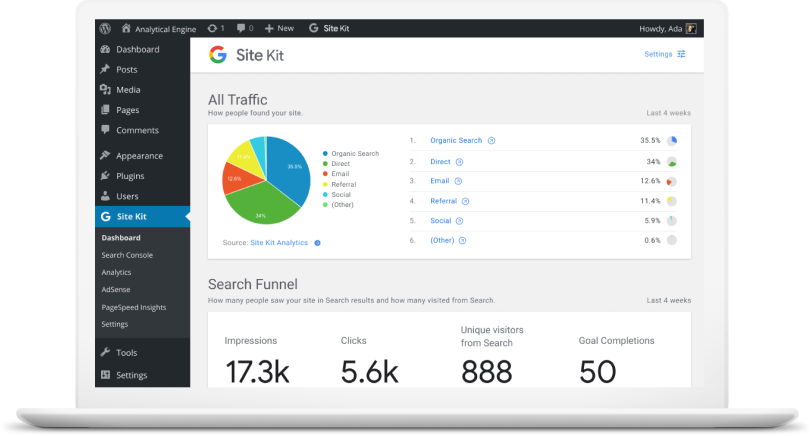
Google Site Kit is a brand new SEO/analytics plugin developed by Google for WordPress. It enables you to connect Google’s online marketing services such as Search Console, Google Analytics, PageSpeed Insights, Google AdSense, Google Optimize and Google Tag Manager – directly to your WordPress site. Once connected, you’ll be able to view search, analytics, PageSpeed performance and other data, directly in your WordPress dashboard, and individually in posts and pages. This is super helpful in gaining page-level insights directly in your WordPress dashboard. In this tutorial, we’ll show you how to install and configure Google Site Kit in WordPress and connect the two most popular Google services to your WordPress dashboard – i.e. Google Search Console and Google Analytics. GET GOOGLE SITE KIT Quick note: Site Kit refers to Google’s services as “properties”. Thus we’ve used the terms “Google services” and “properties” interchangeably in the remainder of the article. Overview of Google Site Kit in WordPress It is important to understand that Google Site Kit’s primary job is to connect (or link) your WordPress site to the corresponding Google services such as Search Console and Analytics. Ideally, you should have previously configured both Search Console and Google Analytics in your WordPress site. If not, then we recommend you first setup both Google Analytics and Search Console before installing Google Site Kit. While Google Site Kit can create a new account for some properties such as Search Console, you should refrain from doing so. We recommend you manually set up both Analytics and Search Console, since the manual method gives you a much better understanding of how marketing analytics works. Here’s a quick overview of what you’ll be doing: Manually install the Google Site Kit plugin. Create and link a new client configuration: A simple click-click-copy-paste job, where Google does most of the heavy lifting for you. Link properties (Google services) such as Google Search Console and Google Analytics to Site Kit. Let’s get started with the tutorial! Source Credit https://www.wpexplorer.com/google-site-kit-wordpress/
Importance of SEO for Your Business Now & In the Future
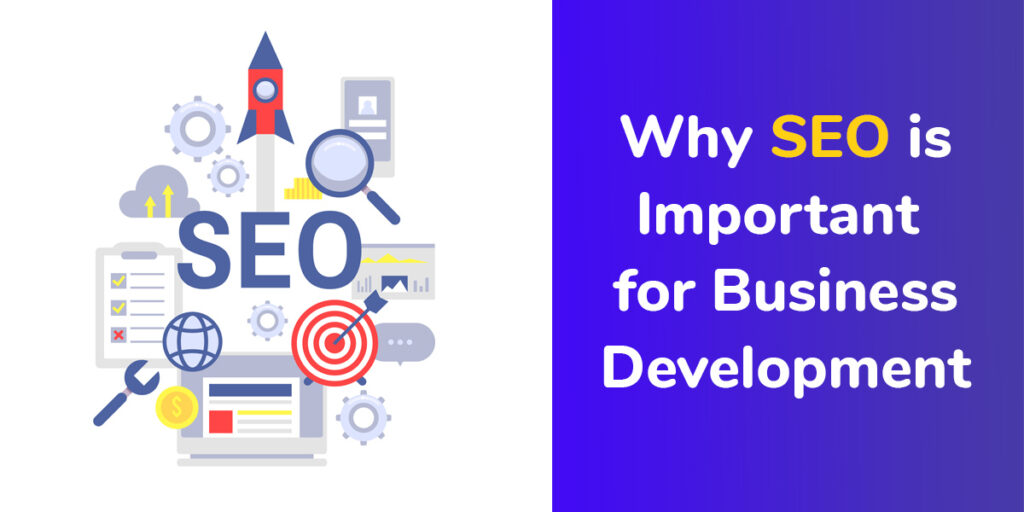
When brands take a long-term look at the importance of SEO, however, they will see that the benefits only multiply the longer they remain focused on the power of optimization. As your SEO improves, the returns you receive will far outweigh your initial investment. Let’s take a look on importance of SEO- The Importance of SEO Now and in the Future 1. Brand building Brand building can help create powerful organizations. When people recognize your logo, colors, and name with a positive reputation that precedes you, it can help build greater trust with prospects. SEO and digital marketing can help capitalize on this. As already discussed, consumers use the internet to research pain point solutions, products, and services. A strong presence online will build your brand and increase your market share. Your site will regularly pop up for searches relevant to your organization. Customers will become familiar with your name and business. A strong online presence will encompass many channels. A complete SEO strategy will involve employing platforms, such as social media. Your brand will be present to customers throughout their digital lives, enhancing recognition and leads. 2. Better positions on the SERP Your position on the SERP will play a large role in the number of clicks you receive. According to Advanced Web Ranking, the top three positions alone on the SERP receive an average of 60% of all the clicks. This means that the higher your site appears, the more results you will gain from your efforts. Focusing on the importance of SEO will help you improve your rankings. As Google recognizes the value that your site offers users in this sector, you will rank higher. SEO helps you to communicate better with the search engine algorithms. Your topic will become clearer to the search engine spiders. You will also let the search engines know for which queries you will be relevant. Customers associate higher rankings on the SERP with industry leaders. Google’s algorithm carefully sorts through content to find the material that provides the most value to the customer and works to separate the content that people can trust from that which they cannot. Customers know that Google’s algorithm generally returns them the sites that will provide them with the best answer. This builds trust. When you earn some of the top ranking positions on the SERP, it provides an excellent platform to promote yourself as an industry leader and someone these consumers can trust. 3. More traffic As you build your rankings, you will be in a greater position to boost your traffic. SEO best practices include optimizing both your titles and meta descriptions to make your topic clear. This lets your customers know precisely what your piece offers. Customers want to know that your site will address their needs. Optimizing these aspects of your site will help persuade them to click. When you combine these elements with the stronger site rankings you get through optimization, you will see increases in your traffic rates. More people will come to your website. As you introduce more people to your websites, you will also nurture more opportunities for people to become leads and then convert. The importance of SEO cannot be underestimated when it comes to organic revenue growth. 4. Higher percentage of traffic becoming leads SEO will also increase the percentage of your traffic that becomes leads. SEO focuses on understanding what prospective customers want to see and then fulfilling those needs. Creating a strong SEO strategy, therefore, will result in a site that is tailored more towards your target customers. With SEO, you need to analyze your sales funnel and determine what people want to see at each stage. You will be able to map your target customer personas to their stages of the buyer’s journey, and thus create more effective content. With content that better engages your visitors, you will be able to lead your prospects through the sales funnel more easily. Customers will be able to find the content they want and you will know how to move them to the next level. This will result in a higher percentage of conversions at each stage. 5. Business growth outside of geographic boundaries With traditional marketing, businesses often remain confined to their immediate geographic area. You promote yourself with direct mail, radio broadcast, and billboards, for example, which only people who live in your area see. With SEO, you have the opportunity to expand your reach beyond your region. You can do business with people across the country. By understanding the importance of SEO and creating an optimized site, your page can rank highly on SERPs for people in a number of different locations. When your content is relevant, it will appear regardless of whether the prospect lives next door or thousands of miles away. SEO, therefore, provides your organization with greater room to grow. You have the chance to expand your prospective audience and thus increase your reach. You will be able to expand your business on a level that would not have been possible previously. 6. Greater understanding of what customers want to see Customers today like to know that businesses understand their pain points. They want to work with companies who address their individual needs. Modern customers want to nurture relationships with businesses and not be viewed as only a number. To serve these customers, both online and offline, you want to intimately understand your customers. This means going deeper than targeting people within a particular age range. You want to understand people’s behavior and why they do certain actions. Before SEO and digital marketing, businesses relied on market research and basic analysis of their own merchandise. They used market research to identify trends in their consumer habits, for example, and would use sales data to see which products and services were the most popular with customers. SEO, however, offers an entirely new level to the ability to understand the customer. Through paying attention to the importance of SEO, you will
How to Create a Powerful Inbound Marketing Strategy?
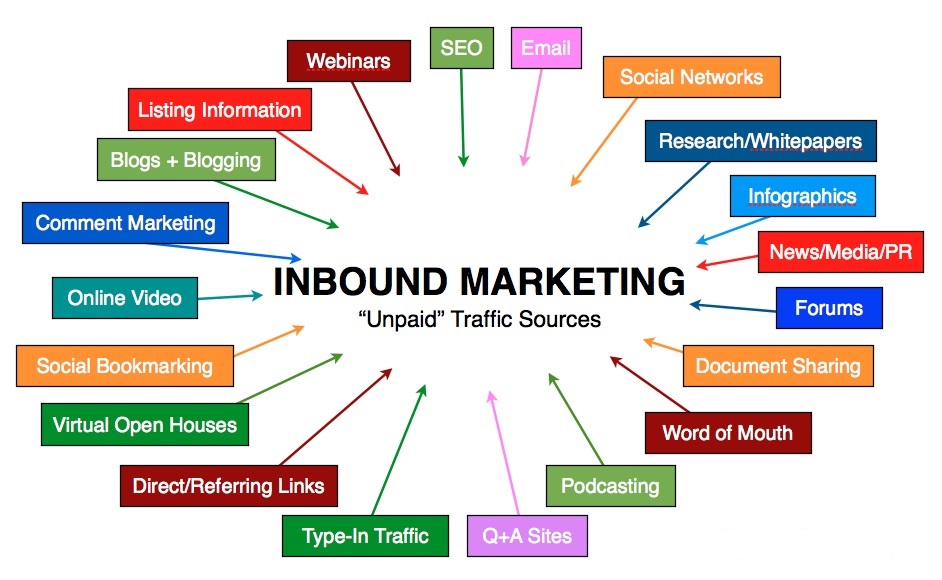
So how does one create a solid inbound marketing strategy? Mass marketing or “push” advertising worked extremely well in the earlier days. But times are changing, and so are consumer preferences. It’s an undeniable fact that consumers online are doing their homework before buying something, especially when they are faced with multiple options. They’re using Google to research products and social media to seek recommendations from friends/family. This is why inbound marketing is gaining more importance than regular outbound marketing. So as a business, you need to understand how “aware” consumers are and what you need to do to get on their radar with a real inbound marketing strategy. There’s no doubt that consumers today want to… Be given priority and get educated about their own problems. Do business with brands that they are familiar with. Know your history and how you’ve helped others in the past. Get more comfortable with the solution they are buying into. The era of hyper-personalized marketing goes beyond relationship marketing. Which means… If you are building a relationship with your target audience, you are increasing the chances of getting more sales. If you are educating them beforehand and giving them the information they need to make a decision, you are making it easy for them to do business with you. If you are delivering value first, you’re giving them a reason to trust your brand. If you are pulling consumers towards your brand instead of pushing your products on them, you’re winning their attention. By focusing on inbound marketing, you are doing all of the above. Which not only helps you get more out of your marketing efforts, but also lets you stand out from the competition. Source Credit https://www.lyfemarketing.com/blog/inbound-marketing-strategy/
Simple WooCommerce Tips To Increase Sales
Where do you stand currently in your WooCommerce store endeavor? Maybe you are planning to launch your WooCommerce store, or maybe you have been running it for a couple of years now. No matter where you’re at you need to work hard on increasing your sales either way. From growing your email list to social media marketing, there are many mediums and platforms you can leverage to increase the sales for your WooCommerce store. However, you need to identify which of them are most useful and give you a better ROI (return on investment). To help you grow your WooCommerce store and increase your sales, I have put together a simple WooCommerce guide. When you finish reading this guide, you will be privy to various tactics including how you can optimize your WooCommerce store in order to boost your sales. Let’s hop in! 1. Choose an Eye-catching WooCommerce Theme As soon as your leads enter your store, the first thing they see is the theme and the overall layout of your store. If they like what they see, then they are definitely going to take a closer look and take time browsing through your store. However, if they see a cluttered and confusing layout, they are going to press the exit button without giving your store a second glance. E-commerce store visitors expect to see an eye-catching user interface that is not only visually appealing but also easy to navigate. Your users should be able to interact with your WooCommerce store without any confusion. All in all, you need to offer an easy and seamless experience to your customers. WooCommerce themes, by and large, can be classified under three categories: Free WooCommerce themes Paid WooCommerce themes Custom WooCommerce themes While you need to choose the theme that best suits your pocket, there’s one important thing you need to keep in mind. Being able to use a free WooCommerce theme is, of course, an added advantage, however, such themes often lack in terms of design and functionality. Therefore, if you truly want to find success in your WooCommerce endeavor, then it is a better idea to opt for paid WooCommerce themes. You don’t necessarily have to spend big bucks purchase a theme. In fact, you should be able to get a great theme for under $100. Lastly, if you are able to shell out a big budget, then you can also get a customized theme. Internet is inundated with so many credible bespoke theme designers and website developers. Costs also vary – but whatever the cost, it is definitely going to cost you more than a pre-existing premium WooCommerce theme. 2. Offer an Easy and Friendly User-Experience The friendlier user-experience you offer, the more people will convert into permanent customers. It’s no brainer — if your leads find it hard to navigate through your website, they are going to abandon it without giving a second thought. Let me be blunt here: yours is not the only store on the internet, the list of your competitors is pretty big. All in all, your leads are not exactly lacking in choice. A big part of a user-friendly e-commerce experience is simple navigation. It directly attributes to a comfortable environment for your visitors. This can easily be achieved using breadcrumb links and navigation menus. WooCommerce Breadcrumbs Simply put, it allows you to customize the default WooCommerce breadcrumbs. Breadcrumbs improve navigation, not just for robots, but for customers too, as they’re able to navigate back to previously browsed categories. This helps them stay on your site for longer without having to hit the back button a thousand times, and it helps search engines index your site for better search ranking. WooCommerce Breadcrumbs helps navigate the site indexing portion of your navigation and makes it easier to put them in place. WooCommerce SEO This premium Yoast SEO extension adds support for WooCommerce, including improved breadcrumbs. Please note that Yoast does not automatically optimize your site for search, but is instead a fantastic tool to help you optimize your content before it even gets published. Much as what Yoast does for blog posts, it continues that work in product pages, sitemaps, and navigation. WooCommerce Product Table Apart from this, you can also incorporate a product table in your WooCommerce store. It will help your audience get a succinct view of your product description, price, important attributes, and a clear “Add to Cart” CTA button. For this, one of the best options is the WooCommerce Product Table plugin by Barn2. This plugin organizes your products into lists that can be shown when a customer searches or filters in your catalogue. Not only does this help the customer find what they’re looking for, it helps search engines index each of your products to make them more easily findable. 3. Add Clear Call to Action (CTA) buttons Buy Now. Add to Cart. Sign up. I think we are all familiar with all these call-to-action buttons. But the main motive is not just to add CTA buttons but to add them in such a manner that they fuel your conversion rate. For that, you need to place your CTA buttons at the right place so that they immediately get discovered by your leads. One thing that you need to keep in mind is that your leads should not have to skim down web pages just to take action. For instance, if a customer intends to add a product to their cart, the “Add to Cart” button should be readily available. They should not need to scroll through your page or to go to great lengths to find it. CTA buttons such as “Add to Cart” and “Checkout Now” especially should be added in prominent places in your WooCommerce store . Moreover, they should not blend in with the website — make sure that they stand out so that your customers immediately distinguish them from the rest of the website and quickly take action. Take advantage of any built-in styling options your WordPress theme
10 Proven SMB Marketing Strategies That Will Work For You

Are you implementing a SMB marketing strategy for your business? Small businesses always have it tougher than well-established businesses when it comes to marketing. First of all, just starting out is a challenge. Whether you are a large or a small company, numerous challenges will be hurled your way. But if you are a small business, then those challenges are magnified. Shortages in budget, time, or manpower are a few examples of those hurdles. Whether a business is built as a B2B or B2C, challenges are present right from the get-go. What about medium-sized businesses? Medium sized businesses do not have it any easier. Sure, they might have a little more when it comes to resources, but not that much. Whatever the struggles that they go through, small-to-medium sized businesses or SMB’s are gaining in prominence. They make up a whopping 99.7% of all businesses in the United States, after all. New SMBs are also being established on a regular basis. So how do they deal with the ups and downs and emerge as one of those that last and succeed? The antidote is SMB marketing. This is a term that refers to the method by which small and medium sized companies market their products. Obviously, they try to do it using a conservative budget, and they are constantly on the lookout for low-cost ways to convert and get sales. Here are 10 proven SMB marketing strategies that will help push your brand while you save. 10 Proven SMB Marketing Strategies That Will Work For You Setting a Goal and a Budget To market your business right, you need to set a goal. What is your vision and endgame for your business? The primary SMB marketing strategy is to set the right goal and a reasonable budget. What do you really want to happen? Are you looking to expand your company’s reach, or do you want to strengthen your hold on the local market? Do you want people to become aware of your brand? All these are valid goals, of course. But as you set the goal or goals that you want to accomplish, you also need to think about your budget. Your budget needs to be in sync with what your goals are. At the same time, it needs to be realistic and practical. The thing is, your goals will not be relegated to just one or two. It is likely that you have several. To avoid confusion and to make it easier to track your growth, you have to prioritize your goals. Which goal matches your most pressing need? Identify that and focus on it first. Then you can set your sights on the long-term goals that you consider to be the most important for your business. Maximize Google’s Local Offerings You can also take advantage of Google’s local offerings. With Google being the largest search engine available, it can definitely offer a lot for small and medium-sized businesses. Having an online presence is a big boost to any SMB, which is almost always a local business. In fact, when you compare a business that is found online with one that is not, the one found online will grow 40% faster. That makes a Google My Business account indispensable for an SMB. For a local business that targets local clients, this is a powerful tool. By having a Google My Business account, you can take charge of the information about your business. That includes address, phone number, website, and hours of operation. Google My Business is also the best place for you to combine all your Google platforms, which include your Google reviews, Google Maps profile, and many more. By having a Google My Business account, your business becomes more credible and more visible to consumers. Choose The Top Social Media Channels To Focus On You might have read somewhere that having an account across all social media channels is the way to go. You have the budget for that and you know your target market exists on every social media platform, go for it! However, if you are an SMB and you are a little short on personnel, then you might not be able to keep up with all your social media channels all the time. Choosing just one to three social media channels to focus on seems to be the wiser choice. Start by analyzing your overall presence on social media. Which of the channels feature the highest number of engagements? That should be your clue about which channel you need to choose. Once you have made your choice, then you can turn your sight to the possible tools that you can use for help. For example, you might want to have someone else take charge of scheduling your social media posts for you. Hootsuite is your best tool for that. Or maybe you want to monitor the keywords that you use. Then Mention is the tool to use. Content Marketing Content marketing is useful for getting long-term results. So if you have a long-term vision for your business, then this is the perfect SMB marketing strategy for you. You need to understand that it is a process in which you have to create content that is Valuable Relevant Consistent Once you have created great content, you need to distribute it to your target audience with the intention of it leading to sales. Please note that content marketing is not limited to written content or blog posts. It can include several different types of content, such as videos, podcasts, and many more. Just remember that you will need to have an ample supply of time and patience when you choose to roll with this strategy. It will also be better if you have some extra resources allotted to it just to make sure that you avoid producing inferior content. Allocating money to cover professional graphic designers etc. can help you avoid wasting time and budget. You don’t want to end up with poor content because
What Are WordPress User Roles?

Did you know that you can give other people access to manage your site? By using WordPress user roles, you can collaborate with people safely and easily, assign different access levels to your site and the content that lies within. In this article, we will cover how WordPress user roles work. WordPress User Roles So – what are WordPress User Roles and what are they used for? As the name suggests, it is a built-in user management feature on your WordPress site. You can define what actions users can and cannot perform, and group them under roles. So, a specific role can be assigned with specific site management privileges. WordPress provides six default user roles to give you more power over your site’s management. Let’s get to know them better. Super Administrator The super administrator role only exists when the WordPress multisite feature is enabled. They are in charge of overseeing all site administrators and the multisite network. They can manage and change everything – from creating and deleting sites, to controlling the content, themes, plugins, and profiles. When the Super Administrator role is enabled, the regular administrator’s privileges are reduced. They can no longer install themes and plugins but can choose to activate or deactivate them. Administrator Administrators have the full power to not only manage your site’s operations but also assign other roles. They can create, delete, review, edit, and publish content, manage plugins and themes, even edit code. This role also has the authority to customize other user roles. You can be your own site’s administrator, or appoint someone else. However, be careful if you want to assign this task to others. It’s critical to choose someone that you trust. Editor Editors have full access to manage all of your site’s content and its attributes. They can create, delete, review, and publish their own posts as well as ones created by other authors. Editors can also manage comments, post categories, and links. Users with this role usually supervise authors and contributors. Author Unlike editors that have full control over the whole content section, authors only have full control over their own posts. They have the authority to create, edit, delete, and publish their own posts. Additionally, they can edit their own user profile. Contributor Similar to authors, contributors are capable of creating and editing their posts and profiles. The main difference between the two is that contributors cannot publish their posts. Subscriber This role can only read posts and manage their personal profile. Basically, all visitors can read posts without being assigned as a subscriber. However, you can encourage users to become subscribers by offering access to special content that can only be viewed by them. Final Notes WordPress’s default user roles are quite beneficial to maintain your site’s operation. You can assign up to six different roles, namely: Administrator – fully manage the site’s maintenance and content Editor – fully oversee the authors and content management Author – is only responsible for their own posts Contributor – is only able to create and edit their post’s content Subscriber – is only able to read posts Super Administrator – fully manages a WordPress multisite network Make sure you have backed up your site and considered the appropriate roles before officially assigning the capabilities. You can add, edit, and delete users from your Dashboard’s admin area. To do so, go to your WordPress Dashboard → Users → Add New. Additionally, you can manually customize the roles by modifying your theme’s functions.php file. However, customizing user roles using a WordPress plugin can be a better option. We recommend the Capability Manager Enhanced plugin to add, remove, edit, and customize user roles with a few clicks. Lastly, remember to always limit the number of user roles and unassign suspicious users. Source Credit https://www.wpexplorer.com/wordpress-user-roles/